
I can see the network but cannot connect · Wi-Fi help
Choose your problem and try one action at a time.
Suggested actions
Android
1 / 3
In Wi-Fi settings, check that the selected network is exactly ilam-uni-ap, then try connecting once.
2 / 3
Using another internet connection, try signing in to the official university account portal. Enter credentials only on the official university domain.
Open official account portal ↗3 / 3
Open the device guide and compare settings for your connection method. For a digital certificate, follow the EAP-TLS section. Do not guess MAC settings or disable certificate validation to fix an error.
Open device connection guide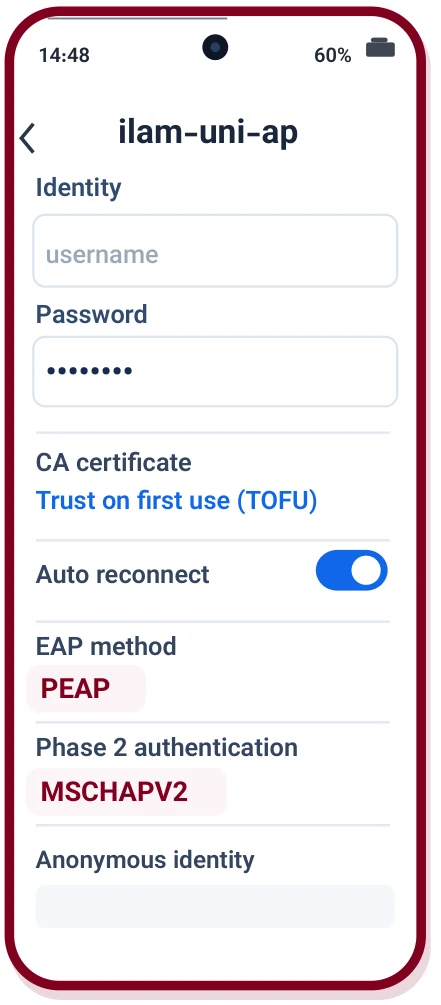
Windows
1 / 3
In Wi-Fi settings, check that the selected network is exactly ilam-uni-ap, then try connecting once.
2 / 3
Using another internet connection, try signing in to the official university account portal. Enter credentials only on the official university domain.
Open official account portal ↗3 / 3
Open the device guide and compare settings for your connection method. For a digital certificate, follow the EAP-TLS section. Do not guess MAC settings or disable certificate validation to fix an error.
Open device connection guideiPhone / iPad
1 / 3
In Wi-Fi settings, check that the selected network is exactly ilam-uni-ap, then try connecting once.
2 / 3
Using another internet connection, try signing in to the official university account portal. Enter credentials only on the official university domain.
Open official account portal ↗3 / 3
Open the device guide and compare settings for your connection method. For a digital certificate, follow the EAP-TLS section. Do not guess MAC settings or disable certificate validation to fix an error.
Open device connection guideOther devices
1 / 3
In Wi-Fi settings, check that the selected network is exactly ilam-uni-ap, then try connecting once.
2 / 3
Using another internet connection, try signing in to the official university account portal. Enter credentials only on the official university domain.
Open official account portal ↗3 / 3
Open the device guide and compare settings for your connection method. For a digital certificate, follow the EAP-TLS section. Do not guess MAC settings or disable certificate validation to fix an error.
Open device connection guideIf it worked
Test the connection or service again. Return to this guide if the problem recurs.
If the problem continues
Prepare your device type, time, error message and actions tried. Never send passwords or verification codes.
Support options